

QuantaCore Labs · Flagship platform
QuantaSync
Five providers, or none at all.
A Windows desktop platform for working with Gemini, Claude, OpenAI and local Ollama and LM Studio servers — with a real IDE, an executing workflow engine, a team of local specialists, and telemetry that is measured or absent. There is no backend, no account and no cloud sync. Everything runs on your machine.
The launch film
Multi-agent AI,
unleashed on your desktop
A produced title piece — not a screen capture. Everything it shows is on the screens below, running locally.
Launch film · 00:10 · produced motion graphics
What it does
One window,
the whole workflow
QuantaSync is not a chat box. It is a workbench: talk to any provider, generate media, edit and run code with an agent, orchestrate a team, wire executing workflows, and watch the cost of all of it in real numbers.
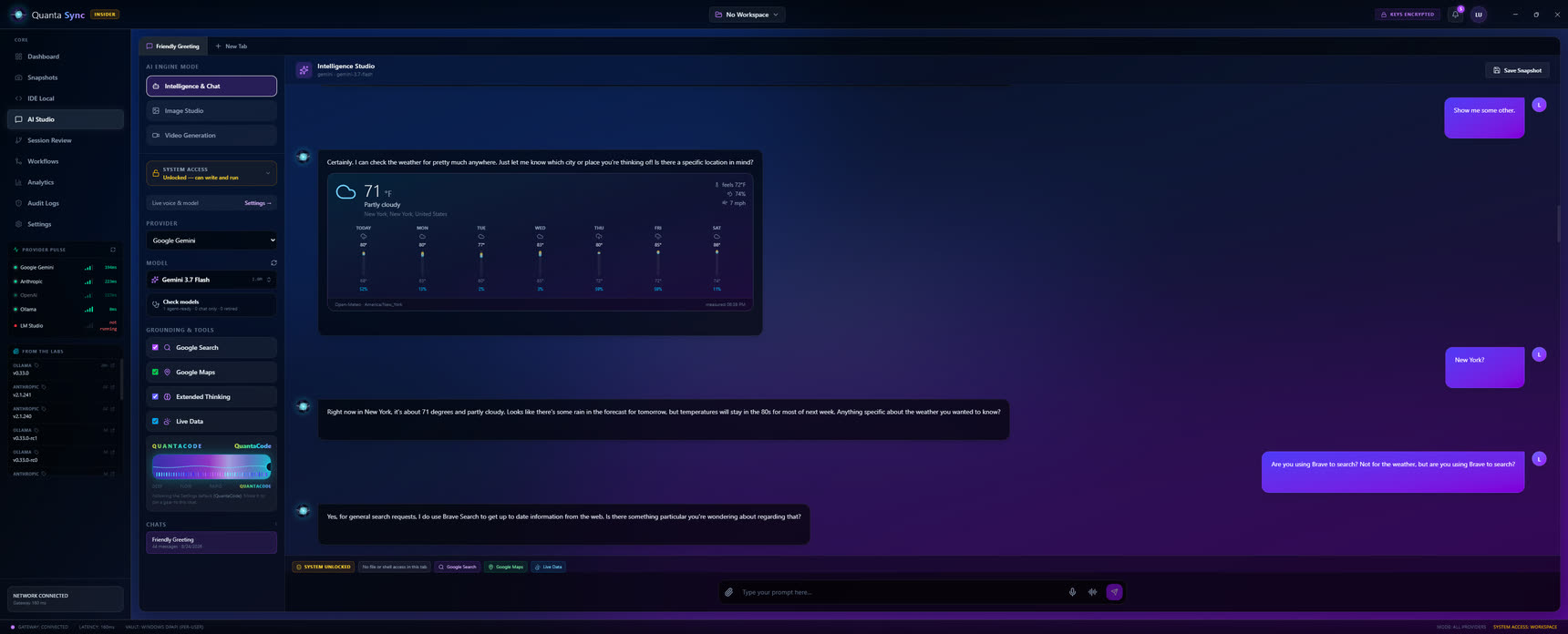
Talk to five providers,
from one place
Streaming multi-turn chat across Gemini, Claude, OpenAI, Ollama and LM Studio. Every request goes straight from your machine to whichever provider you pick — no server of ours in between, no account, nothing synced. Model lists are fetched live from each provider, so the menu is always what is actually available to you.
- Provider pulse — real gateway latency measured continuously, so you can see what is genuinely fast today
- Intelligence tools — image and video studios sit inside the same conversation
- Local models, no key — point at Ollama or LM Studio and press Scan; nothing leaves the box
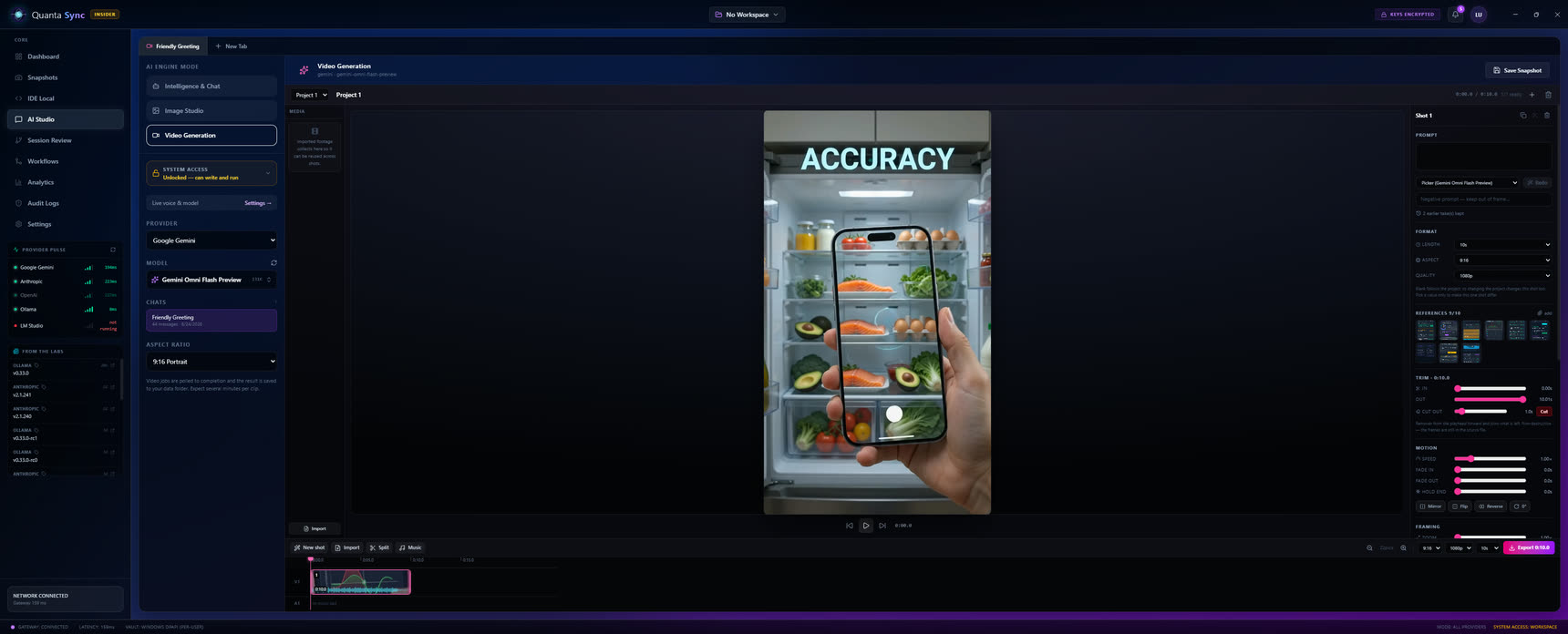
Generate images and video,
saved to disk
The studio drives each provider's image and video models directly. Long-running video jobs are polled to completion and written to your media folder — no browser tab to keep open, no link that expires. What you make is a file on your machine.
- Polled to done — the app waits out the render and saves the result, then tells you where
- Live model lists — the exact image and video models each provider currently offers
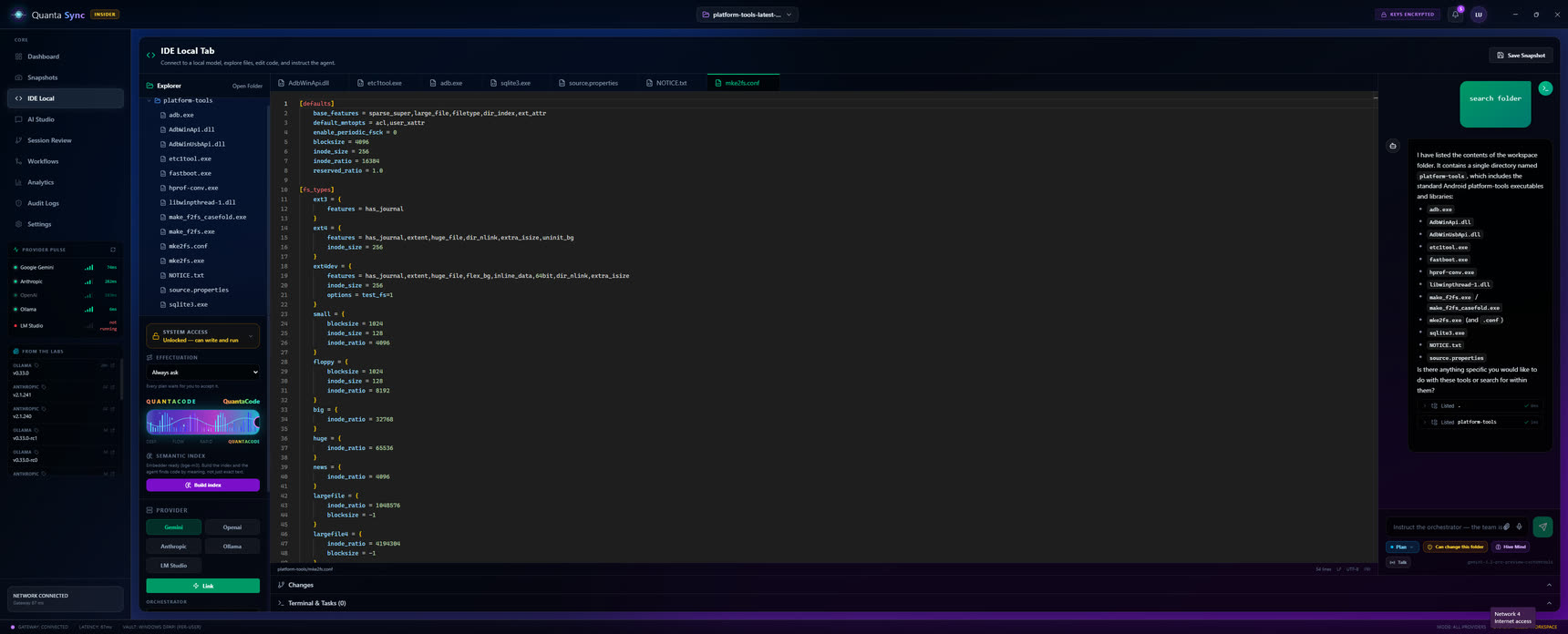
A real IDE,
with an agent that acts
A file explorer, the Monaco editor, an interactive terminal — and a coding agent that reads, edits and runs commands across any of the five providers. The editor is bundled, not fetched, so the whole IDE works with no network at all.
- Reads, edits, runs — the agent works in your actual workspace, not a sandbox copy
- Any provider — drive the agent with a cloud model or a local one, switched per task
- Voiceprint Lock — high-risk actions can require a live voice match before they run
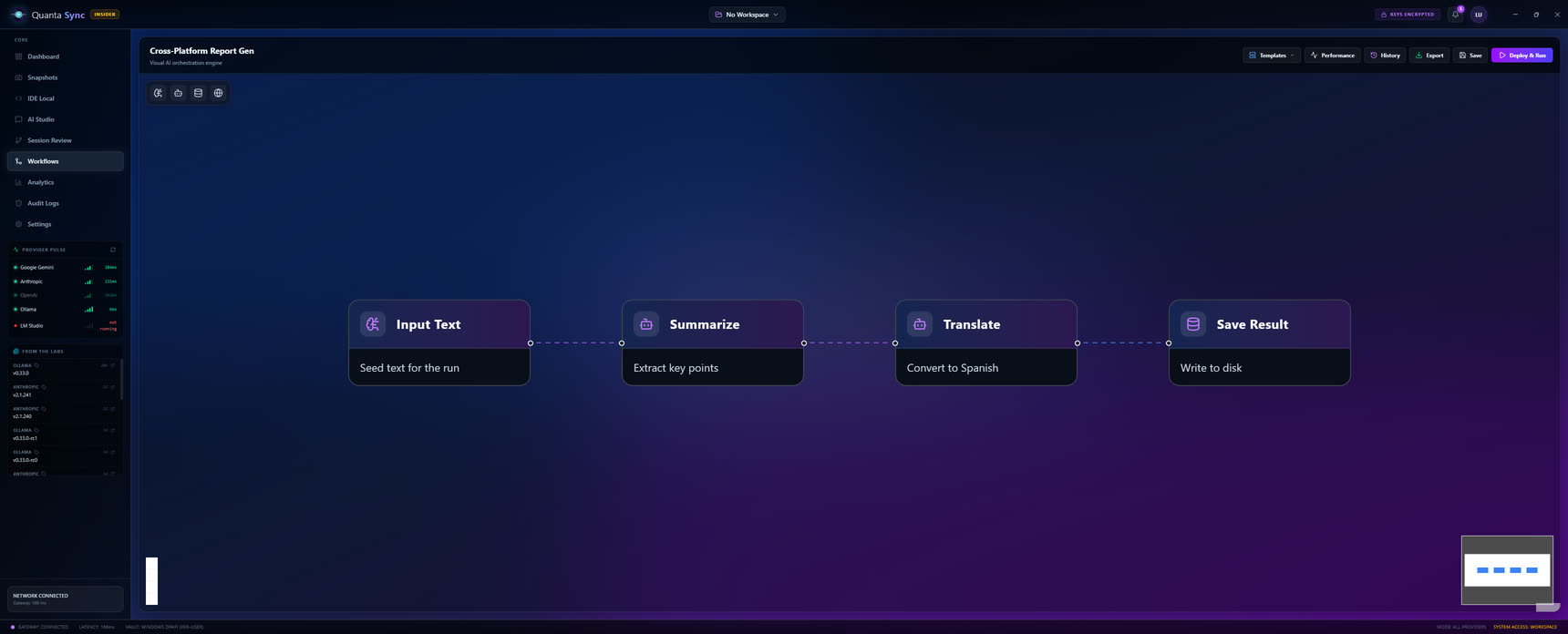
A node graph that
actually executes
Not a diagram of a pipeline — a pipeline. Nodes run in topological order: AI steps, HTTP calls, file reads and writes, each streaming its status onto the canvas as it goes. Build a cross-platform report generator once and run it on demand.
- Real execution — topological order, per-node status streamed live onto the graph
- AI, HTTP and file nodes — mix model calls with the plumbing around them
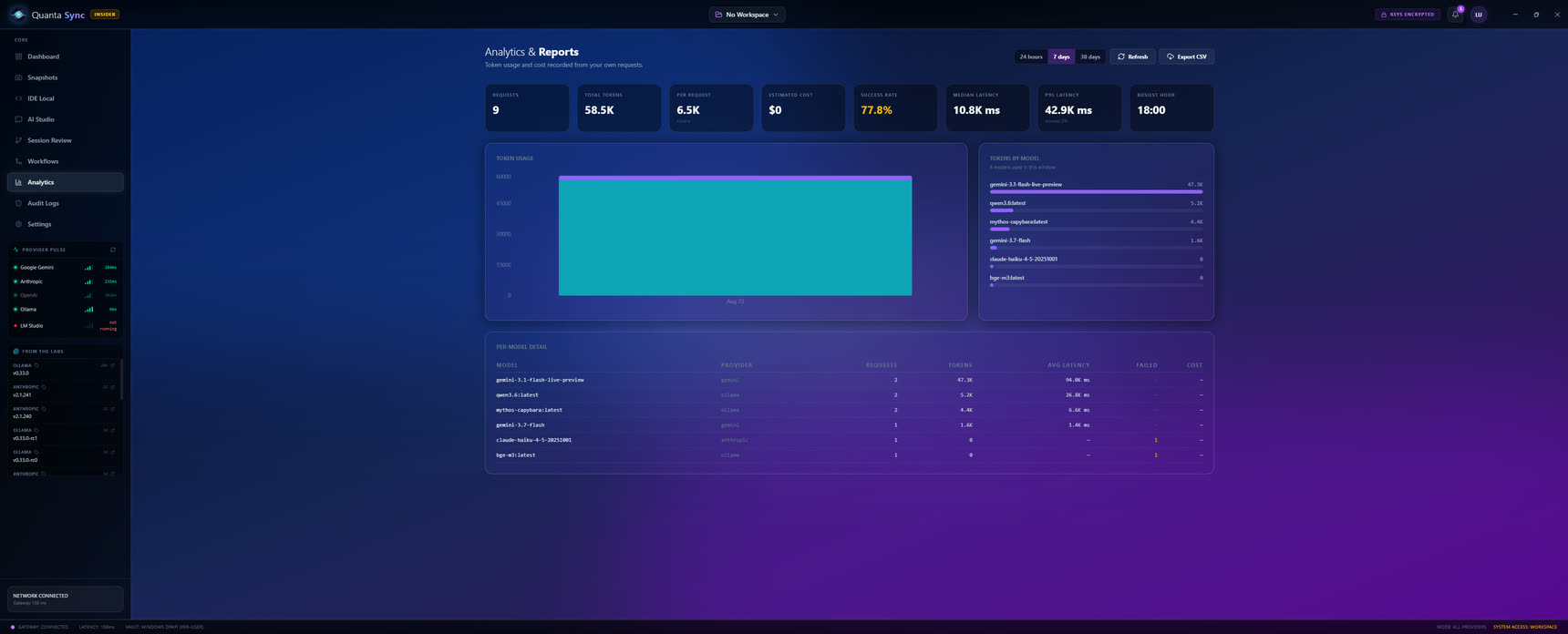
Cost you can see,
accumulated from your own use
Token, cost and latency figures built up from your real requests — per model, exportable to CSV. Every action is recorded to an audit log you can search and filter, and workspace snapshots are written to disk and survive restarts.
- Measured, not modelled — the numbers come from what you actually ran, not an estimate
- Audit log — every action to disk, with working search, level filter and CSV export
- Snapshots — save a workspace state and come back to it after a restart
The headline feature
Hive Mind —
a team on your own GPU
Enable Hive Mind and the agent you are already chatting to becomes an orchestrator: same
conversation, same permissions, plus one tool. consult_team
puts a task to five specialists at once — each its own local Ollama model, each reading your
code before it answers.
Mythos
Structure, ownership, where the seams belong.
local Ollama modelGemma
The shortest correct path; what will be slow.
local Ollama modelLlama
Races, leaks, edge cases, security.
local Ollama modelMistral
The actual code.
local Ollama modelGranite
Ordered steps and the commands that verify them.
local Ollama modelEach specialist gets read_file, list_directory and search_files and investigates the workspace itself, so its report cites real code. They are read-only — only the orchestrator writes.
The team runs concurrently, so consulting all five costs roughly what consulting one does. It also works in Plan mode: five models analyse while nothing on disk can change.
Set your card's memory and the scheduler reads each model's real size, packs members into groups that fit, and unloads a group before the next loads — so an oversized member gets the card to itself instead of starving the others.
npm run check-model grades a model before you assign it. A member that can only describe a tool call in prose can't read your code — it answers blind, and its report is labelled as such so the orchestrator discounts it.
Why it's trustworthy
Local by construction
The privacy story isn't a promise in a settings screen — it's enforced where it can't be bypassed. This is the same discipline the rest of the studio is built on.
Keys in the OS vault
API keys are encrypted with Windows DPAPI, scoped to your account, and never reach the interface — the UI only ever sees the last four characters. Stored in vault.bin, alongside a quark-store.json that holds settings, logs and history.
Offline Mode at the boundary
Enforced in the main process, not the interface. With it on, every cloud call is refused at the IPC boundary — chat, model listing, image and video, the coding agent, workflow AI and voice. Ollama and LM Studio keep working; the bundled editor needs no network at all.
A voiceprint that gates risk
Enrol three samples and Voiceprint Lock makes the agent's high-risk actions — deleting files, dangerous shell commands — require a live voice match first. Matching runs locally against averaged MFCC vectors; no audio leaves the machine for it.
Real screens
Every pixel is the running app
More from the working build — the telemetry dashboard, the voice settings, and the live voice agent.
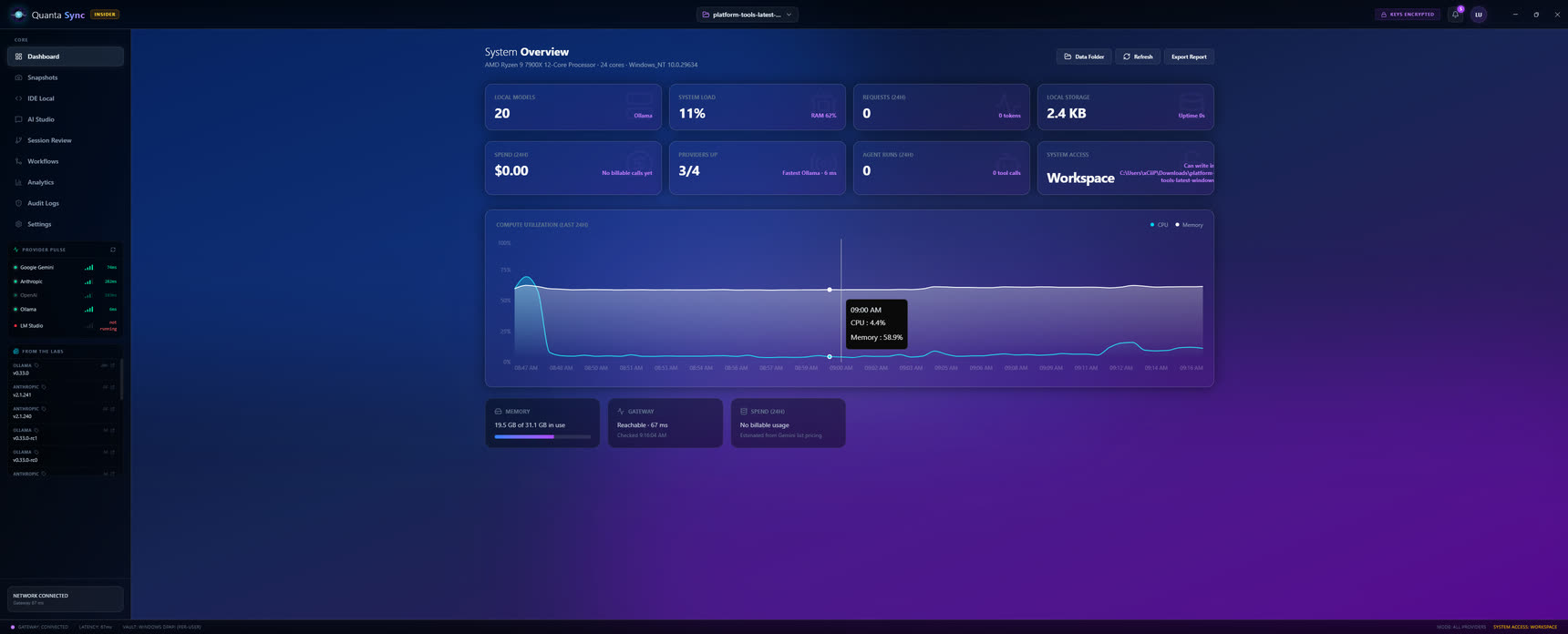 Unified dashboard · live telemetry
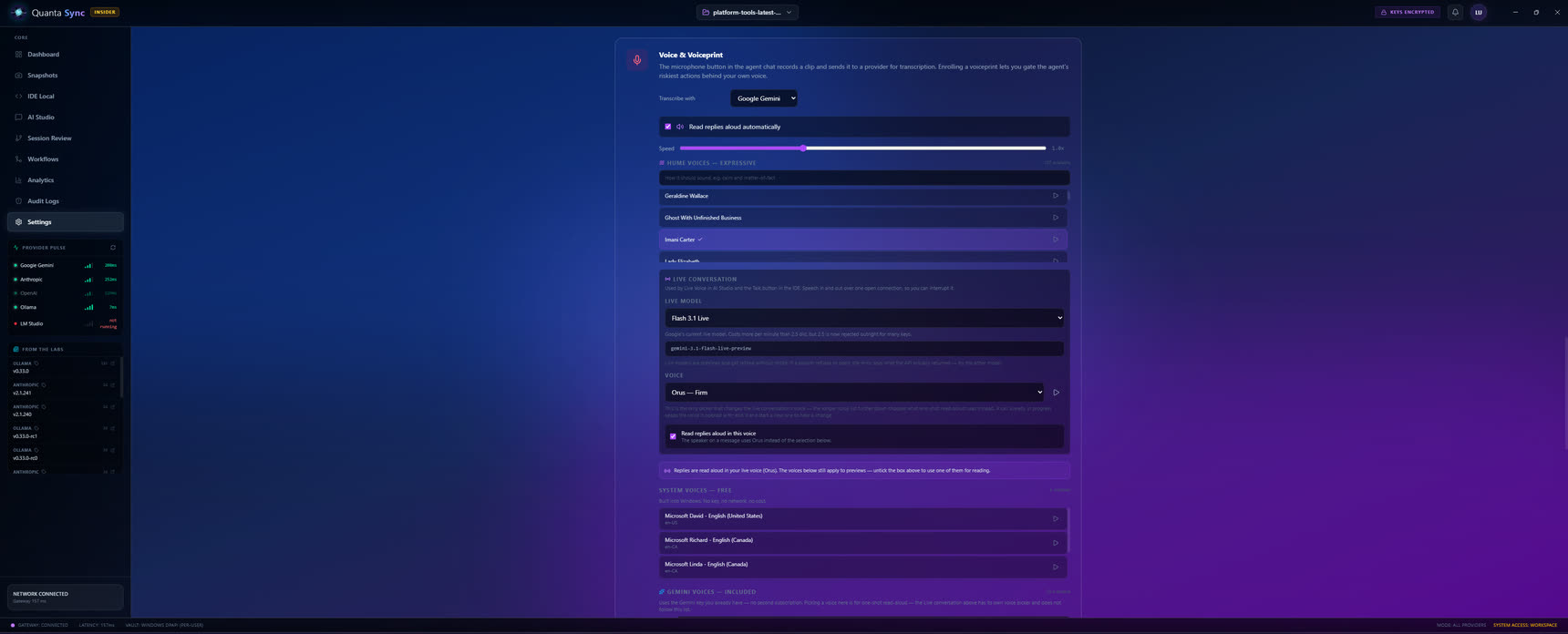 Settings · Voice & Voiceprint
Every voice — and a print to guard the agent
- Your transcriber — records a clip in the agent chat and sends it to Gemini or OpenAI Whisper, your pick
- Read replies aloud — automatically, with a speed dial for how fast
- Three voice tiers — expressive Hume voices, Gemini's included set, and Windows system voices with no key, no network and no cost
- Live conversation — speech in and out over one open connection you can interrupt, on Google's Flash 3.1 Live model
- A voiceprint that gates risk — enrol your voice to put the agent's most dangerous actions behind a live match, checked locally
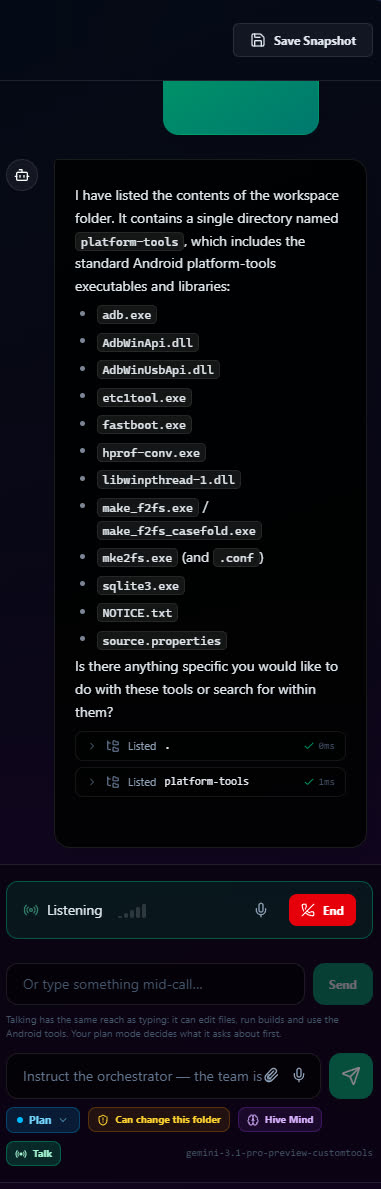
Talk to the agent,
and it works
Press Talk and instruct the orchestrator by voice — it lists the workspace, edits files and runs builds, the same as typing. The controls sit right there: Plan mode decides what it may do first, a toggle sets whether it can change the folder, and Hive Mind can fan the task out to the team.
- Same reach as typing — spoken instructions edit files and run commands, not just dictate text
- Voiceprint Lock — high-risk actions can require a live voice match before they run, matched locally
Part of the studio
QuantaSync is one of nine
It shares a design language and a lot of the same plumbing with everything else QuantaCore Labs builds — and the same rule underneath: every number is measured, or it isn't shown.